slipstreaming a SATA driver to the Acer 4730z. Before we begin you’ll need the following:
Blank CD or DVD
CD/DVD Writer
Windows XP SP2
nLite
ASUS F8SG SATA Driver
Let’s get down to business.
1. Make sure that your licensed Windows XP CD is in your ROM drive.
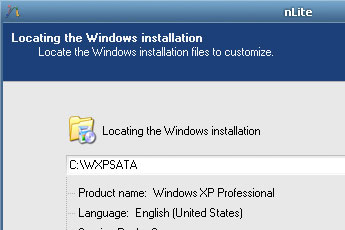
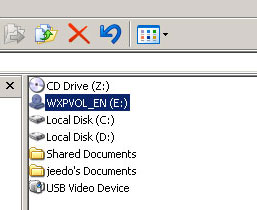 2. Start nLite and when it asks for the location of your installer, click the ROM drive where your Windows XP CD is. Then when asked where to locate the writable install just put in C:\WXPSATA.
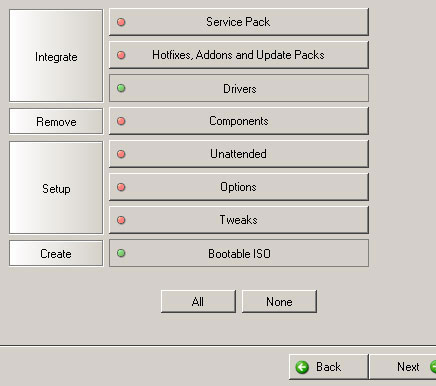
 3. On the next prompt, make sure you enable Drivers integration and creation of a Bootable ISO.
 4. Before you proceed make sure you have unzipped the the compressed SATA driver for ASUS F8SG and look for the following file: iaAHCI.inf.
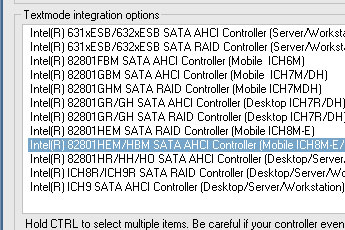
5. On the next prompt, choose Textmode driver integration and the Intel 82801HEM/HBM SATA AHCI Controller.
4. Before you proceed make sure you have unzipped the the compressed SATA driver for ASUS F8SG and look for the following file: iaAHCI.inf.
5. On the next prompt, choose Textmode driver integration and the Intel 82801HEM/HBM SATA AHCI Controller.
 6. When you are prompted if you want to process the installer directory, click Yes and wait for the integration to finish.
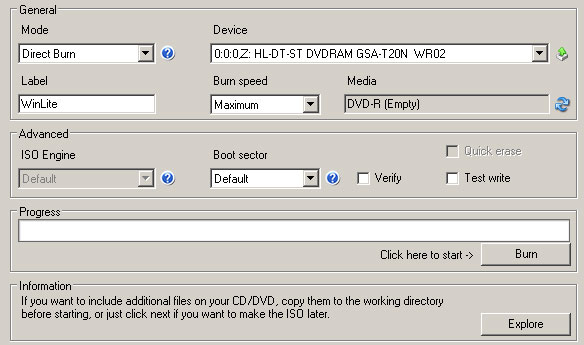
7. On the next window make sure you click on the Burn button and wait for the process to finish.
6. When you are prompted if you want to process the installer directory, click Yes and wait for the integration to finish.
7. On the next window make sure you click on the Burn button and wait for the process to finish.
 8. After burning you should see a Customization finished! message and therefore have created a Windows XP SP2 installer slipstreamed with the SATA driver for ASUS F8SG.
You can now use the installer to “clean” install Windows XP SP2 on your ASUS F8SG laptop. Hope this helps. ^_^]]>
8. After burning you should see a Customization finished! message and therefore have created a Windows XP SP2 installer slipstreamed with the SATA driver for ASUS F8SG.
You can now use the installer to “clean” install Windows XP SP2 on your ASUS F8SG laptop. Hope this helps. ^_^]]>